
Discount codes
Discount codes let you offer percentage discounts to customers during booking. The discount applies to all selected services in the booking. You set the discount percentage, when the code is valid, and whether it's active. This is useful for promotions, seasonal offers, or rewarding loyal clients.
How discount codes work
A discount code is tied to an active window. When a customer enters the code during booking, they receive the percentage discount you defined. The code only works when it's active and within the scheduled dates.
Create a discount code
Go to your admin area and open Discounts.
Click New discount code.
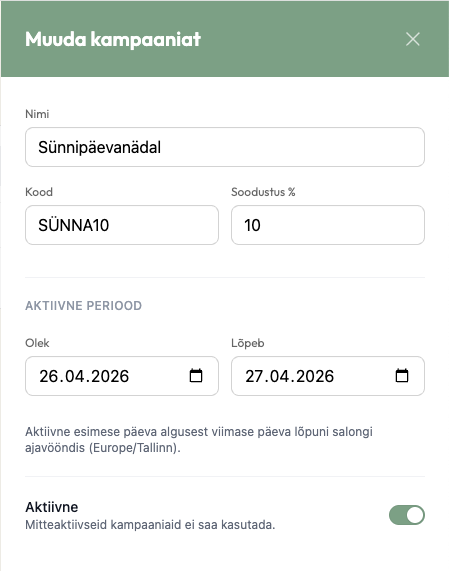
Fill in the details:
Name — A label for your reference, such as "Summer Promotion" or "Birthday Week". This is not shown to customers.
Code — The code customers enter at booking. Codes are automatically converted to uppercase. For example, entering "bday10" becomes "BDAY10". Codes must be 2 to 40 characters and unique within your salon.
Discount (%) — The percentage off the booking total. Must be between 1 and 100.
Starts and Ends — The dates when the code is valid. The active window runs from the start of the first day to the end of the last day in your salon's timezone.
Active — Toggle whether the code can be redeemed. Inactive codes cannot be used, even if the current date falls within the active window.
Click Create discount code.
Manage existing discount codes
The Discounts page lists all your codes with their current status, discount, and active window. Birthday discounts appear separately in the Automatic offers section above the code list; see Birthday offers.
Filter and search
Use the status filters to show All, Active, Scheduled, Ended, or Inactive codes.
Search by name or code using the search field.
Activate or deactivate
Use the Activate or Deactivate button on any row to control whether the code can be redeemed. This is useful for pausing a promotion without deleting it.
Edit a discount code
Click on a row to open the edit panel. You can update the name, code, discount, dates, and active status. Click Save changes when done.
Delete a discount code
Click Delete on the row. Deleted codes cannot be recovered.
How status works
Discount codes have different states based on their dates and active toggle:
Active — The code is within its active window and the active toggle is on. Customers can redeem the code.
Scheduled — The active toggle is on, but the start date is in the future.
Ended — The end date has passed.
Inactive — The active toggle is off. The code cannot be redeemed regardless of dates.
Rules and limits
Codes are case-insensitive and automatically converted to uppercase.
Each code must be unique within your salon.
The discount applies to all selected services in the booking. If a customer books multiple services, each one receives the discount.
The active window is based on your salon's timezone, not the customer's.
Customer experience


Customers enter the discount code during the booking process. If the code is valid, active, and within the scheduled window, the discount is applied to their total.
Share your booking link
To promote your discount, share your public booking link along with the code. You can find your booking link on your Home page or in Settings. See Quickstart for details on finding and sharing your booking link.